

Quick Answer#
GemBrush is a selective editing tool within the Media Editor that lets you brighten, darken, or remove blemishes from specific parts of your jewelry photos. It gives you precise control over image enhancements without affecting the entire image.
Where Can I Find GemBrush?#
GemBrush is available within the Media Editor.
You can access it by:
Opening an existing image and selecting Edit Image.
Opening the Media Editor immediately after capturing an image from the preview screen.
Once the Media Editor opens, select GemBrush to access the available brush tools.
GemBrush Tools#
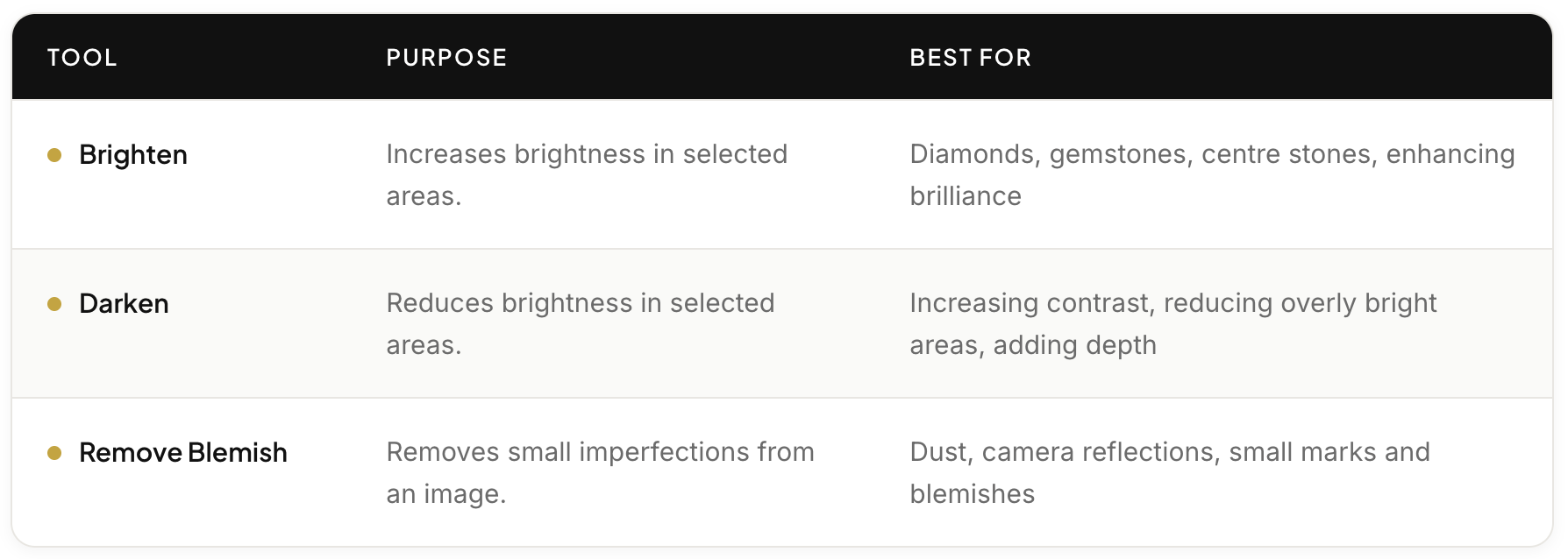
GemBrush currently includes three editing tools designed for different image adjustments.
 |
|---|
Each tool only affects the area that you paint, giving you precise control over your edits.
Adjusting the Brush Size#
You can change the brush size before painting.
A smaller brush is ideal for:
Small gemstones
Prongs
Fine details
A larger brush is better for:
Large gemstones
Multiple stones
Broader areas of the jewelry
Choose the brush size that best matches the area you want to edit.
Undoing Changes#
Each continuous brush movement is treated as a single brush stroke.
If you make a mistake, simply click Undo to remove the most recent stroke.
If you stop brushing and begin again, each new brush movement is treated as a separate stroke.
Best Practices#
To achieve natural-looking results:
Make small adjustments rather than large ones.
Use the Brighten tool to enhance brilliance without overexposing the jewelry.
Use the Darken tool to improve depth and contrast.
Only use Remove Blemish on actual imperfections such as dust or reflections.
Applying multiple passes with the Brighten or Darken tools will increase the effect, so adjust gradually until you're satisfied with the result.
Expected Result#
Using GemBrush, you'll be able to make precise, localized adjustments to your jewelry photos, enhancing sparkle, improving contrast, and removing minor imperfections while maintaining a natural appearance.
Common Questions#
Does GemBrush edit the entire image?#
No. GemBrush only edits the areas that you paint with the brush, giving you greater control over your image.
Can I undo my edits?#
Yes. You can undo the most recent brush stroke at any time.
Can I use GemBrush immediately after taking a photo?#
Yes. GemBrush is available from the Media Editor on the capture preview screen, allowing you to edit your image before saving it.
Can I adjust how large the brush is?#
Yes. You can resize the brush before applying any edits, making it suitable for both fine details and larger areas.