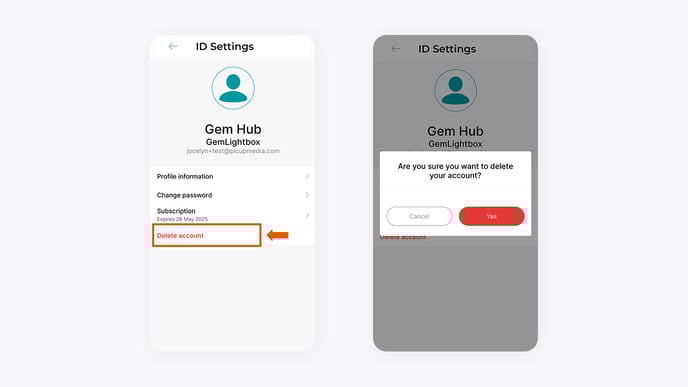
How to Delete Your GemIQ Account
Quick Answer
You can permanently delete your GemIQ account and all associated data from your profile settings within the GemHub. This action is irreversible and will remove all your images, videos, catalogs, and account information.
Before You Start
Warning: Deleting your account is permanent and cannot be undone. All your media and data will be permanently erased.
Back up any images, videos, or other data you wish to keep before proceeding.
You must be logged into the GemIQ account you intend to delete.
Steps
Open the GemHub and navigate to your Profile section.
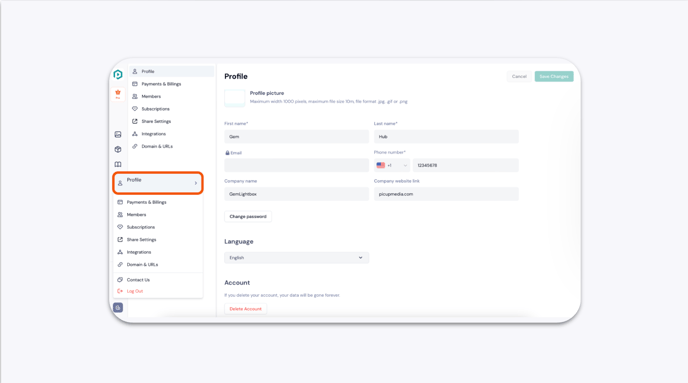
Your Profile in The GemIQ App In your profile settings, scroll to the bottom of the page and select Delete Account.
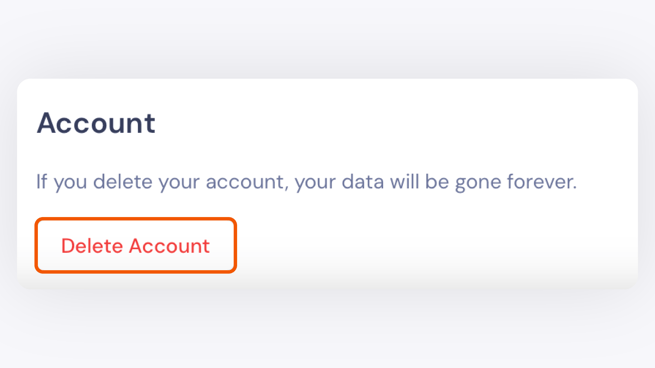
Delete Account Button Location A confirmation window will appear, warning you that the action is permanent. Read the message carefully.