

Some reflections are expected when photographing jewelry, especially on polished metals and gemstones.
To minimize unwanted reflections:
Close the front panel of the GemLightbox during capture.
Adjust the angle of the jewelry rather than shooting directly from the front.
Use GemBrush to remove any remaining distracting reflections after capture.
Why Are Reflections Normal?#
Jewelry is one of the most challenging products to photograph because it is designed to reflect light.
Materials such as:
Gold
Silver
Platinum
Diamonds
Highly polished gemstones
will naturally reflect their surroundings, including the camera, lighting, and even the opening of the lightbox.
Because of this, it is normal to see some reflections in your images. Even professional jewelry photographers spend time positioning the jewelry and performing light retouching after the photo is taken.
The objective is not to remove every reflection, but to reduce distracting reflections while maintaining the jewelry's natural brilliance and depth.
Shoot with the Front Panel Closed#
Keeping the front panel closed creates a more enclosed lighting environment.
This helps the jewelry reflect the white interior of the GemLightbox instead of the darker opening or surrounding environment, resulting in cleaner-looking images.
Adjust the Shooting Angle#
Instead of taking a perfectly front-facing image, try making small adjustments to the jewelry's position.
Even rotating or tilting the piece slightly can move unwanted reflections away from prominent areas without affecting the composition.
It is often worth taking a few test shots to find the angle with the fewest distracting reflections.
Remove Remaining Reflections with GemBrush#
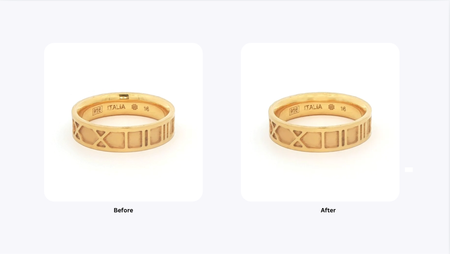
After capturing the image, use GemBrush in the media editor to manually remove any small reflections that remain.
GemBrush is ideal for:
Camera reflections
Lightbox opening reflections
Small distracting highlights
Minor imperfections
For the most natural-looking result, use GemBrush for touch-ups rather than attempting to remove every highlight from the jewelry.
Best Practices#
For the cleanest results, we recommend this workflow:
Close the front panel of the GemLightbox.
Position the jewelry and adjust its angle until reflections are minimized.
Capture several images from slightly different angles.
Select the best image.
Use GemBrush for final touch-ups if necessary.
Remember, some reflections are expected when photographing reflective jewelry, and a small amount of retouching is a standard part of jewelry photography.
Expected Result#
After following these recommendations, your images should have significantly fewer distracting reflections while preserving the natural sparkle and appearance of the jewelry.
Common Questions#
Why do I still see reflections?#
Because jewelry is inherently reflective, some reflections are expected. The GemLightbox helps minimize them, but highly polished surfaces may still reflect light and surrounding objects.
Can the GemLightbox completely eliminate reflections?#
No. No photography setup can completely eliminate reflections from highly reflective jewelry. The goal is to minimize unwanted reflections through good lighting, positioning, and light retouching.
Should I remove every reflection?#
No. Small highlights help jewelry look realistic and showcase its brilliance. Focus on removing only reflections that distract from the product.